
Introduction
Planning a trip to the Atacama is a map-first problem: waypoints replace tokens and layered maps encode altitude, road surface, and light pollution. This guide gives the interactive maps, printable PDFs, and downloadable KML/GeoJSON assets you need to turn raw geodata into reliable, offline-ready itineraries for safe travel and world-class stargazing.
- Quick facts
- Why a map matters for Atacama travelers — the model justification
- Types of maps you need (and why) — a taxonomy
- Interactive web map
- Printable tourist map
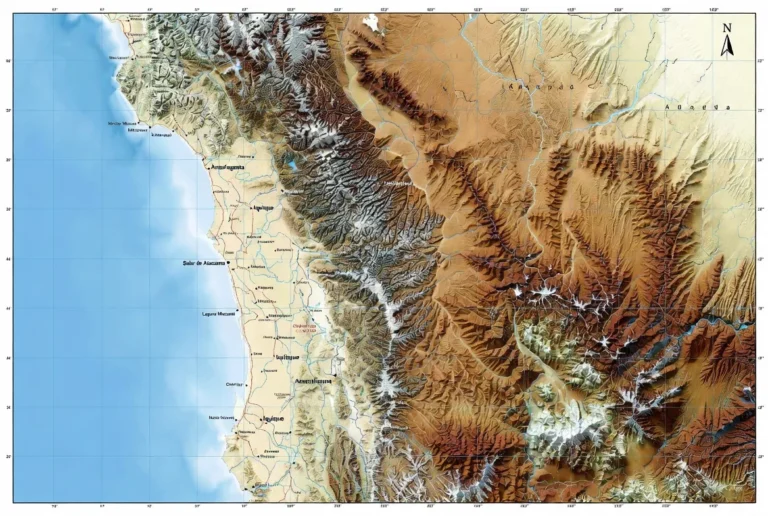
- Topographic / altitude map
- Satellite imagery layer
- KML / GeoJSON / GPX downloads
- Light-pollution / Bortle overlays (astronomy-focused)
- Best map layers to include — a checklist
- Where to get reliable data & embeddable assets
- Interactive maps — how to embed them
- Printable maps & downloads — what to include
- KML / GeoJSON / GPX — export formats & recommendations
- Distance & time table — a compact reference
- Map-based itineraries
- 1-day map snippet — Valle de la Luna loop
- 3-day map itinerary — Classic Atacama
- 7-day map-first loop — Altiplano & lagoons
- Practical mapping tips
- Stargazing & astronomy — map layers you must include
- Detailed place guide — map-friendly notes
- San Pedro de Atacama
- Valle de la Luna
- Tatio Geysers
- Salar de Atacama
- Flora & fauna — map-tagging suggestions
- Human history & culture — map places to visit
- Survival tips & mapping challenges
- Tourism: activities and map-driven choices
- Interesting facts
- Environmental issues & conservation
- Pros & Cons of a map-first approach
- Pros
- Cons
- Comparison: popular map sources
- How to read the Atacama map
- Developer/Producer checklist — build, test, deploy
- Legal & ethical mapping reminders
- FAQs
- Conclution
Quick facts
- Location: Northern Chile, west of the Andes.
- Length (north–south): ~1,600 km.
- Area commonly cited: ~105,000 km² (definitions vary up to ~128,000 km²).
- Main travel hub: San Pedro de Atacama.
- Closest major airport: El Loa (Calama, CJC).
- Driving distance Calama → San Pedro: ≈ 100–112 km (≈ 1.5–2 hours depending on stops & vehicle).
Why a map matters for Atacama travelers — the model justification
A map is not just a picture; in the Atacam, it is an operational model. Maps provide:
- Distance and time priors — some attractions are hours apart if the road is gravel.
- Data-type awareness — paved vs gravel, seasonal closures, emergency exits.
- Altitude context — many sites rise above 3,500 m; altitude is a latent variable in health and schedule.
- Dark-sky telemetry — stargazing depends on local light-pollution vectors.
- Offline fidelity — KML/GeoJSON and PDFs are like caching model weights offline: crucial where signal is absent.
If your trip is a prediction task, the map is the training set you trust: annotate it well, version it, and carry an offline snapshot.
Types of maps you need (and why) — a taxonomy
Different map types serve different intents. Treat each as a specific model architecture:
Interactive web map
- Tools: Leaflet, Mapbox, Google My Maps.
- Why: toggle POIs, switch base layers (satellite/topo), and visualize polylines/heatmaps.
- Good for: mobile planning, route previews, layer stacking, and export.
Printable tourist map
- Formats: A3 for regional planning, A4 for pocket copies.
- Why: battery-free, universally readable under stress.
- Good for: multi-day drives and emergency reference.
Topographic / altitude map
- Data: DEM / SRTM.
- Why: reveal steep gradients, passes, and altitude ramps.
- Good for: acclimatization planning and route feasibility checks.
Satellite imagery layer
- Why: locate ephemeral riverbeds, salt-crust anomalies, or campable terrain.
- Good for: verifying the shape of tracks and avoiding soft salt.
KML / GeoJSON / GPX downloads
- Why: load ready-made routes and waypoints into offline GPS apps (OsmAnd, Maps.me) or hardware units.
- Good for: reproducible navigation and safe replication.
Light-pollution / Bortle overlays (astronomy-focused)
- Why: find true dark-sky pockets (SQM >21).
- Good for: night photography, amateur astronomy, and astrophotography scheduling.
Best map layers to include — a checklist
When you assemble an interactive map or printable, include these informative layers:
- Travel hubs: San Pedro, Calama, Antofagasta.
- Attractions & POIs: Valle de la Luna, Tatio Geysers, Salar de Atacama (Chaxa), Miscanti & Miñiques, Puritama, Cejar & Baltinache.
- Services: fuel stations, clinics, ranger posts, tourist info.
- Road quality: paved, gravel, seasonal closures, river Crossings.
- Altitude contours and waypoints > 3,000–4,200 m.
- Light pollution/sky quality overlay.
- Emergency contacts & hospital locations.
- Protected zones and “sensitive habitat” polygons.
Label these clearly, and provide toggles so users can query specific layers based on their mission (stargazing vs birdwatching vs 4×4 exploration).
Where to get reliable data & embeddable assets
Treat your map like a data pipeline and combine trustworthy sources:
- Wikimedia Commons — public SVGs for print-ready vector art.
- Chile. travel, municipal sites — official labels, park rules, and permitted access.
- OpenStreetMap + Mapbox — editable vector tiles and routable data.
- LightPollutionMap / VIIRS layers — stargazing overlays.
- NASA / SRTM — DEM for elevation profiles.
- Local GIS & tour operators — for validated POI layers and notes (good for field reality checks).
Always check licensing and attribute sources in your downloads and printable footers.
Interactive maps — how to embed them
If you’re embedding a web map:
- Library choice: Leaflet for lightweight, Mapbox GL for richer vector styling.
- Base layers: OpenStreetMap (vector) + satellite tiles lazy-loaded.
- Overlays: POIs, route polylines, altitude contours, stargazing polygons.
- Downloads: one-click PDF, KML/GeoJSON, “Open in Google Maps” links.
- Performance: vector tiles + tile caching; lazy-load heavy satellite tiles.
- Accessibility: high-contrast legends, alt-text for static map images, keyboard navigation if possible.
- Mobile-first: UI controls should be thumb-friendly; avoid tiny toggles.
For each route polyline, include metadata: creator, date, expected driving time, surface type, and recommended vehicle.
Printable maps & downloads — what to include
A robust A3 printable map should include:
- Legend, north arrow, and scale bar (km).
- Main routes with distances and driving times.
- Altitudeinset/profile for each multi-day route.
- Emergency contact box (local numbers, nearest hospital).
- Fuel and water refill points.
- Suggested safe campsites and permitted camping zones.
- QR code linking to the interactive map and downloadable KML/GeoJSON.
- Simplified emergency one-page version for drivers to carry.
Provide both a full-resolution SVG (for print) and a compressed PNG thumbnail for quick sharing.
KML / GeoJSON / GPX — export formats & recommendations
- KML/GeoJSON: descriptive metadata (name, description, altitude, contact). GeoJSON is human-readable and web-friendly.
- GPX: good for breadcrumb logs and track export for dedicated handheld GPS units.
- Include altitude tags for critical waypoints above 3,000 m.
- Version your downloads and include a checksum file so users can validate integrity after download.
- Test: verify imports into OsmAnd, Maps.me, GaiaGPS, and common Garmin devices if possible.
Distance & time table — a compact reference
| Route | Distance (km) | Typical drive time |
| El Loa (Calama CJC) → San Pedro de Atacama | 100–112 km | ≈ 1.5–2 hours |
| San Pedro → Valle de la Luna | ~13 km | 20–40 min |
| San Pedro → Tatio Geysers | ~89 km | 1.5–2.5 hours (very early start) |
| San Pedro → Salar de Atacama (Chaxa) | ~50 km | ≈ 1–1.5 hours |
Note: distances depend on where in town you start and which exact route you pick. Always check exported KML/GPX before departure.
Map-based itineraries
Below are three map-first itineraries. Each is tied to downloadable KML/GeoJSON polylines (imagine each itinerary as a saved model checkpoint you can load into your device).
1-day map snippet — Valle de la Luna loop
- Start/End: San Pedro de Atacama.
- Route: San Pedro → Valle de la Luna → viewpoints → return.
- Distance (round trip): ~30–40 km.
- Time on map: 2–4 hours, including short hikes.
- Map tip: Mark the park gate coordinates and sunset viewpoint on both interactive and printable maps.
3-day map itinerary — Classic Atacama
- Day 1: San Pedro → Valle de la Luna → short scenic stops.
- Day 2: San Pedro → Salar de Atacama (Chaxa) → Cejar & Baltinache → Puritama Hot Springs.
- Day 3: Early drive to Tatio Geysers → return to San Pedro.
- Map tip: plot fuel and water points for Day 2 and an altitude profile for the Tatio morning.
7-day map-first loop — Altiplano & lagoons
- Add Miscanti & Miñiques lagoons (altitude ~4,100 m+).
- Add north/south tracks, village stops, optional coastal extension to Antofagasta.
- Map tip: mark emergency exit routes and nearest hospitals for each day; use DEM for elevation profiles on long climbs.
Practical mapping tips
- Fuel: always mark every fuel stop. Refill in Calama and San Pedro before long stretches.
- Water: carry 3–5 L per person per day on road trips. Some attractions have no services.
- Phone & offline maps: download offline Google Maps tiles and export KML. Keep a printable PDF backup.
- Altitude: San Pedro ~2,400–2,600 m; many sites exceed 4,000 m. Plan acclimatization.
- Vehicle: for off-road track,s bring a 4×4 and plot exact tracks. Carry spare tires and GPS breadcrumbs.
Stargazing & astronomy — map layers you must include
The Atacama is world-class for astronomy, but the best spots are specific. For any stargazing ma,p include:
- Light-pollution / Bortle overlays (VIIRS or SQM layers).
- Observatory markers: ALMA and other research facilities should be clearly marked as restricted access (informational only).
- Moon phase and Milky Way overlays or a small calendar layer for easy night planning.
- Road-safety info for night drives: distance to town and whether the last leg is safe in the dark.
- Parking & access points: prefer marked turnouts and avoid narrow single-track exits.
Detailed place guide — map-friendly notes
San Pedro de Atacama
- What to map: accommodations, restaurants, tourist info, ATM, fuel.
- Altitude note: ~2,400–2,600 m (mark acclimatization zones).
Valle de la Luna
- What to map: park entrance, viewpoints, dunes, permitted vehicle times.
- Distance: 13–17 km, depending on the gate.
Tatio Geysers
- What to map: park coordinates, warming shelter, and parking.
- Distance: ~89 km; altitude ~4,000 m. A very early start is typical.
Salar de Atacama
- What to map: flamingo viewing platforms, coordinates (approx -23.28, -68.07).
- Tip: GPS can act oddly on salt flats — mark the official parking viewpoint.
Flora & fauna — map-tagging suggestions
- Birdwatching lagoons: mark flamingo and other waterbird hotspots (Chaxa).
- Protected flora: tag cushion plant communities and fragile cacti zones with “do not camp”.
- Best viewing times: early morning and late afternoon for wildlife activity.
Human history & culture — map places to visit
- Archaeological sites: Pukará de Quitor and Atacameño sites — mark conservation status and guide contacts.
- Village stops: map small villages with services; local guides often have the best place names and warnings.
Survival tips & mapping challenges
- Seasonal watercourses: mark ephemeral rivers and known wash crossings; these become impassable after rare rains.
- Sand & navigation: when satellite imagery shows faint tracks, rely on local waypoints and KML breadcrumbs.
- Weather anomalies: keep a weather overlay or link on your map for flash-flood risk or rare snow events.
Tourism: activities and map-driven choices
- Stargazing tours: pick sites using dark-sky overlays and driving distance from San Pedro.
- 4×4 tours: map licensed operators’ meeting points and emergency exit routes.
- Self-drive: export detailed KML to your device, ensure fuel/water waypoints are plotted, carry spare tires, and consider satellite communication for remote legs.
Interesting facts
- The Atacama is a Mars analog for rover tests — maps sometimes show research zones.
- Its dryness and altitude have made it a global hub for radio and optical astronomy; map observatory clusters (ALMA, others) are “informational only.”
Environmental issues & conservation
- Protected zones: mark park boundaries and restricted research sites.
- Avoid camping on fragile crusts and cushion-plant communities — add a “sensitive habitats” polygon.
- Support local conservation: include contact info for local groups on map downloads and suggest donation/volunteer links in the map footer.
Pros & Cons of a map-first approach
Pros
- Gives travelers clear situational awareness (distances, altitudes, services).
- Increases conversions for tourism websites.
- Serves casual visitors and technical users (astronomers, trekkers).
Cons
- Requires regular maintenance (road & service changes).
- Interactive maps can hurt page speed if not optimized.
- Licensing and attribution for datasets must be managed carefully.
Comparison: popular map sources
| Source | Strength | Weakness for a traveler |
| Wikipedia / Britannica | Authoritative facts & boundaries | Not map-first; few GPS downloads |
| Chile. travel (official) | Official names & rules | Promotional tone; limited GIS downloads |
| LonelyPlanet/travell guides | Experience-based tips | Limited technical map detail |
| Local interactive maps (AtacamaContact, etc.) | Local POIs & routes | Lower E-A-T; few file downloads |
| OpenStreetMap + Mapbox | Editable vector data & routing | Needs assembly for printable maps |
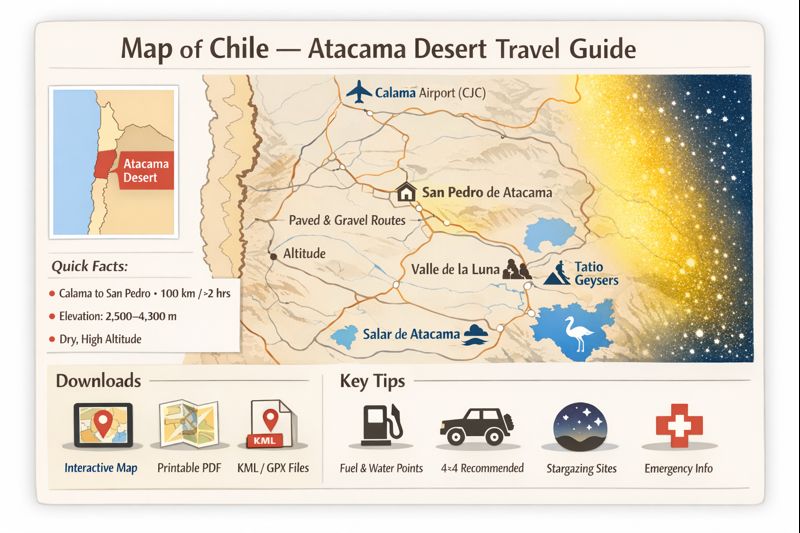
How to read the Atacama map
- Scale matters: 1:250,000 shows regional routes; 1:50,000 is better for off-road detail.
- Road symbols: solid = paved; dashed = maintained gravel; dotted = 4×4 track.
- Altitude contours: 100 m intervals are useful near lagoons and passes.
- Time estimates: gravel slows you — add 30–50% to map-derived times for gravel sections.
- Navigation: use KML breadcrumbs when satellite imagery shows vague tracks.
Developer/Producer checklist — build, test, deploy
- Create vector tiles and tilesets for smooth pan/zoom.
- Implement layer toggles and permalink sharing (URL with ?layer=stargazing&route=3day).
- Test exports: KML, GeoJSON, GPX.
- Ensure printable SVGs have embedded metadata (title, description, contact).
- Add a cache-busting version string to download URLs and provide checksums.
- Conduct user testing: desktop, tablet, low-bandwidth mobile.
- Monitor feedback and maintain an “update” date on the page.
Legal & ethical mapping reminders
- Respect protected areas: do not publish routable polylines through research-restricted zones.
- Mark ALMA and other sensitive installations as informational only — do not encourage access.
- Attribute data sources (OSM, NASA, Chile, travel) per licensing terms.
FAQs
A: The nearest airport is El Loa (Calama, CJC). The overland distance to San Pedro is roughly 100–112 km and usually takes about 1.5–2 hours by car or shuttle, depending on stops and traffic. Always check your specific pickup point and consider additional time for altitude acclimatization, luggage transfer, and border/permit processing if you’re on a multi-leg transfer.
A: Yes. Wikimedia Commons offers public SVG map assets suitable for printing. Many travel and municipal sites provide downloadable PDFs. For GPS navigation, export KML/GeoJSON or GPX and test the file in your offline app before departure.
A: Light-pollution (Bortle/SQM) overlays, altitude/topographic layers, and cloud-climatology layers are essential. Add observatory markers (informational only) and moon phase layers for planning the best nights.
A: Coverage is patchy outside towns and main paved roads. Download offline maps, export KML/GPX routes, and carry a printable PDF as a backup. Consider satellite communication for very remote tracks.
Conclution
A well-built map is your single source of truth in the Atacama—annotate fuel, water, altitude, Emergency exits, and sensitive habitats, then export offline snapshots and a printable backup. With layered interactive maps, KML/GeoJSON exports, and clear metadata, you’ll travel smarter, safer, and ready to enjoy the desert’s spectacular skies.