
Introduction
The Thar Desert in western Rajasthan is a dynamic landscape of dunes, salt flats, scrubland, and settlements — and an excellent map turns that complexity into practical insight. This guide shows which layers, file formats, and styling choices to include so planners, conservationists, travellers, and field teams can download, print, and use a best-in-class Thar Desert map.
- Why a Great Thar Map Matters
- Quick Download Options
- What the Map Must Show — Layer List
- At-a-Glance: Quick Facts
- Data Sources & Licensing
- How to Build Each Layer — Practical Steps
- District boundaries
- Desert extent
- Protected areas
- Hydrography
- IGNP canal network
- Tourist POIs
- Roads & infrastructure
- NDVI / Vegetation overlay
- Services & safety
- Map Styling Tips
- File Types & Recommended Use Cases
- Technical Settings for GIS Users
- Suggested Symbology & File Naming Conventions
- Symbology guidelines
- File name examples:
- District-Focused Guides
- Jaisalmer
- Barmer
- Bikaner
- Jodhpur & Nagaur
- Tourism & Travel Maps — Practical Tips
- Environmental Issues & Conservation Considerations
- How IGNP Changes the Map — A Focus Section
- GIS Tips & Examples
- Printable Map Recommendations
- Accessibility & Licensing
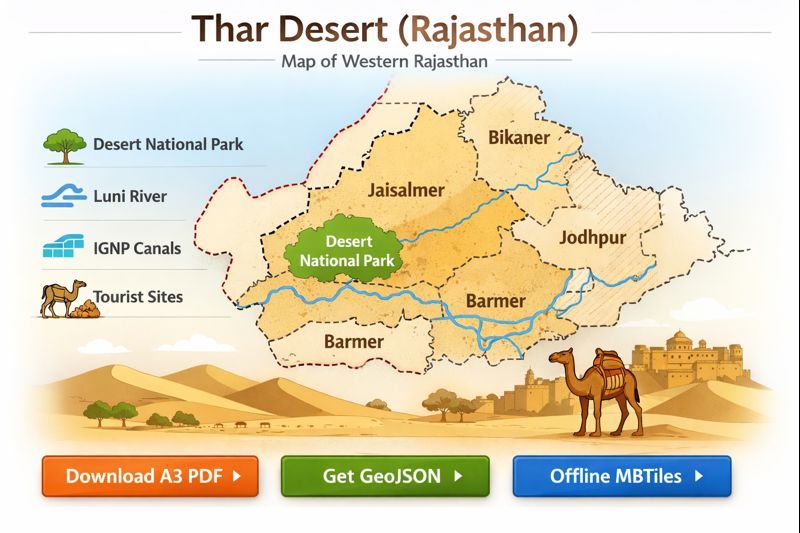
- Example Map Legend
- Symbols
- Download & Use Cases Table
- FAQs
- Conclution
Why a Great Thar Map Matters
Maps shape behavior and policy. In the Thar context, layered maps:
- Inform tourist itineraries (Jaisalmer circuit, camel safaris).
- Support conservation planning (Desert National Park, bustard habitats).
- Guide infrastructure decisions around IGNP canals and roads.
- Help field teams with offline materials (A4 pocket maps, MBTiles).
- Provide a transparent and updatable dataset for researchers and local administrators.
A single static map cannot do all of this. The solution comprises a set of modular, well-documented layers that users can mix and match according to their specific needs.
Quick Download Options
Offer clear, prominent download choices so users can immediately access the resource they need:
- A3 PDF — full legend & grid (recommended for route planning)
- A4 PDF — pocket map (simplified, lightweight)
- GeoJSON — districts & parks (vector data for GIS)
- MBTiles — offline tiles (for mobile mapping apps and field use)
What the Map Must Show — Layer List
Each layer should be independently downloadable and clearly sourced. Below is a prioritized list with short notes on why each layer matters.
- District boundaries — Jaisalmer, Barmer, Bikaner, Jodhpur, Nagaur (plus fringe districts). Administrative layers are essential for governance, disaster response, and local routing.
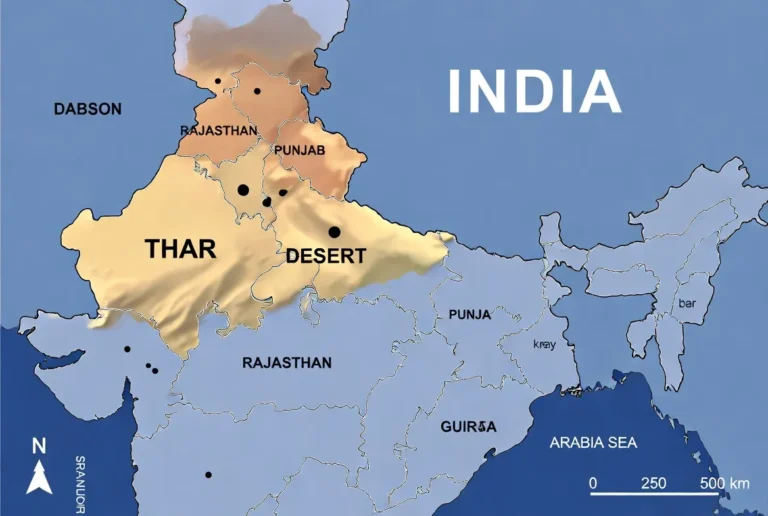
- Desert extent — core polygon and fringe/transition zone. Helps distinguish hyper-arid areas from semi-arid margins.
- Protected areas — Desert National Park, Tal Chhapar, and regional reserves. Fundamental for conservation planning and visitor guidance.
- Hydrography — Luni River, seasonal drains, salt lakes (Sambhar, Pachpadra). These features drive wildlife distribution and human usage.
- IGNP canal network — main lines, laterals, command-area polygons. IGNP has reshaped irrigation and land use; mapping it is non-negotiable.
- Tourist POIs — Jaisalmer Fort, Sam & Khuri dunes, camel camps, ranger stations. Useful for trip planning and wayfinding.
- Roads & transport — NH/SH, district roads, tracks, railway, and bus stations. Differentiate road classes to set user expectations for travel time and vehicle needs.
- Vegetation / NDVI overlay — satellite-derived greening to show irrigated pockets and seasonal changes.
- Danger & permit zones — border-restricted areas near the India–Pakistan boundary; clearly mark and annotate permit requirements.
- Services — fuel stations, hospitals, police, and BSF checkpoints. Essential for safety and logistics.
At-a-Glance: Quick Facts
| Item | Key fact |
| Area (approx.) | The Thar Desert ~200,000 km² across India & Pakistan (Indian portion primarily in Rajasthan). |
| Core Rajasthan districts | Jaisalmer, Barmer, Bikaner, Jodhpur, Nagaur. |
| Major protected area | Desert National Park — ~3,162 km² (Jaisalmer/Barmer). |
| Key water infrastructure | Indira Gandhi Nahar Pariyojana (IGNP) — an extensive canal network. |
| Best printable map size | A3 for planning; A4 for field use and pocket maps. |
Data Sources & Licensing
When building authoritative maps, start with primary sources:
- Government datasets — Rajasthan state agencies, Forest Department, Survey of India shapefiles for administrative boundaries and protected areas.
- OpenStreetMap (OSM) — roads, POIs, and many services; good for community updates.
- Remote sensing — Sentinel-2 / Landsat for NDVI and seasonal analysis.
- IGNP maps & reports — for canal alignments and command-area extents.
- Local field surveys — GPS waypoints for camps, ranger posts, and sensitive sites.
Always include clear licensing: attribute government data per their terms, and prefer CC BY-SA for user-contributed overlays. Publish a short “how to cite” and an update log on the download page.
How to Build Each Layer — Practical Steps
District boundaries
- Acquire official gazetteer or state-admin datasets.
- Clean geometries in QGIS: fix invalid topologies, remove slivers, simplify for web export.
- Produce two outputs: high-precision GeoJSON (for GIS) and generalized GeoJSON/TopoJSON (for web).
- Add district centroids and administrative headquarters labels.
Desert extent
- Create two polygons: core desert (stable dunes, hyper-arid) and fringe/transition (semi-arid).
- Use remote sensing thresholds (NDVI & aridity indices) and land cover classification to delineate.
- Provide a confidence attribute (e.g., 2026-01-01: high/medium/low) and update history.
Protected areas
- Import official boundaries from the Rajasthan Forest Department or Protected Areas atlas.
- Add attributes: protection category, management authority, visitor centres, ranger stations.
- Create smaller layers for visitor facilities and sensitive zones (bird nesting sites).
Hydrography
- Map permanent channels vs ephemeral drains with separate attributes.
- Mark seasonal extents and floodplain buffer zones.
- Use distinct symbology for salt flats (Sambhar, Pachpadra): hatched fill and notes on accessibility.
IGNP canal network
- Draw mainline polylines; then add laterals and tertiary channels.
- Create command-area polygons and attributes by year-of-data and irrigation status.
- Add hydrological notes: headworks, barrages, control structures.
Tourist POIs
- Compile POIs with name, type, short description (30–50 words), GPS coordinates, opening hours, and contact info if available.
- Use distinct icons: fort, dune, camp, wildlife-viewpoint.
- Add a difficulty or access rating for each POI (e.g., 1–5).
Roads & infrastructure
- Classify roads: NH, SH, district road, cart track.
- Add surface type and Seasonality notes (e.g., washouts during monsoon).
- Mark permit-required roads near the border.
NDVI / Vegetation overlay
- Compute NDVI mosaics for representative months (pre-monsoon, post-monsoon).
- Convert irrigated blocks into polygons and classify by crop intensity where possible.
- Provide a toggle for “greening” overlay.
Services & safety
- Map fuel stations, medical facilities, police posts, and BSF checkpoints.
- Add emergency contact numbers as an annex in the PDF.
Map Styling Tips
- Legend: Make it compact, readable, and printable. Use icon sizes that reproduce well at A4.
- Colors & textures: For print, include high-contrast fills and hatch/textures so maps remain legible in black-and-white photocopies.
- Fonts: Use legible typefaces; for A4, ensure body labels are ≥10 pt.
- Scale bars: Add both metric and degree/minute ticks for navigation.
- North arrow & grid: Always include a north arrow and selectable grid ticks (e.g., 10 km / 0.25°).
- Attribution block: Include data sources and license info in the PDF metadata and a small footnote on the map.
- Accessibility: Provide a plain-text legend and alt text for downloadable images.
File Types & Recommended Use Cases
- Fast A4 PDF (≤1 MB) — tourist pocket map featuring key POIs and major roads.
- Hi-res A3 PDF (3–10 MB) — full legend, scale bars, and NDVI inset for planning and fieldwork.
- GeoJSON / KML (0.5–5 MB) — discrete layers for GIS users.
- MBTiles / XYZ tiles (5–200 MB) — offline tiles for OsmAnd, Maps.Me and other mobile map clients.
- Interactive Leaflet / Mapbox embed — web interactivity with layer toggles, search, and print mode.
Provide download size estimates next to each asset and a short “how to use” (for MBTiles: recommended storage; for GeoJSON: instructions to import into QGIS/OsmAnd).
Technical Settings for GIS Users
- Coordinate systems: Default GeoJSON in WGS84 (EPSG:4326). Offer UTM (EPSG:32643 — UTM zone 43N) for high-precision work.
- Print resolution: 300 DPI for A3/A4; 600 DPI for billboard-quality exports.
- Scales:
- 1:200,000 — broad route overviews on A3.
- 1:50,000–1:100,000 — local detail and tourist maps.
- Grid: Offer 0.25° or 10 km grid ticks.
- Simplification: Use Douglas-Peucker for web geometries and keep an unsimplified dataset for downloads.
- Metadata: Include source, date-of-data, projection, contact, and license info as attributes or a metadata file.
Suggested Symbology & File Naming Conventions
Symbology guidelines
- Desert core — pale sand fill (light tone).
- Fringe — hatched gradient to semi-arid.
- Salt flats — dense hatch and label.
- Luni River — solid blue for perennial; dotted for ephemeral.
- IGNP main canal — thick cyan line; laterals thin cyan lines.
- Protected areas — solid green polygon with outline.
- Tourist camp — tent icon; fort — castle icon.
- Border-restricted zone — red dashed line.
File name examples:
- thar-desert-rajasthan-a3-2026.pdf
- thar-districts-geojson-2026.geojson
- jaisalmer-sam-route-geojson-2026.geojson
- thar-mbtiles-zoom6-14-2026.mbtiles
District-Focused Guides
Provide short, district-specific notes to accompany single-district GeoJSON/PDF extracts. Each extract should include the suggested scale, key POIs, and any permit considerations.
Jaisalmer
- Scale: 1:100,000 for tourist maps.
- Show city details inside Jaisalmer Fort, Sam, and Khuri dunes, camel camp clusters.
- Include camping zones, GPS waypoints for camps, and permit-required routes near the border.
- Distances: Jaisalmer → Sam Dunes ≈ 40 km (show with distance markers on A3).
Barmer
- Map pastoral grazing land and IGNP-irrigated plots.
- Include oil-field infrastructure where relevant (note extraction zones).
- Provide GeoJSON for irrigated parcels (attribute: crop/irrigation year).
Bikaner
- Include Junagarh Fort, the town grid layout, and transport access to the northern salt lakes.
- Add historical caravan routes overlay as an optional layer.
Jodhpur & Nagaur
- Highlight where agriculture encroaches into desert margins.
- Use NDVI to show seasonal green-up and identify agro-tourism spots.
Tourism & Travel Maps — Practical Tips
- Pocket map (A4): Large icons for POIs, primary roads, and a small inset of the Jaisalmer circuit.
- Route planner (A3): Full legend, grid, NDVI inset, fuel and emergency services, conservative travel-time estimates for sand tracks.
- Fuel & safety: Mark fuel stops, hospitals, and emergency contacts (ranger stations, BSF checkpoint numbers).
- Permits: Clearly mark permit-required zones and provide a short how-to for obtaining permissions (district administration / BSF contact details).
- Offline use: Offer MBTiles and short importing instructions for OsmAnd and Maps.Me.
Environmental Issues & Conservation Considerations
IGNP has transformed parts of the Thar by introducing irrigation into previously hyper-arid landscapes. While improved livelihoods are a benefit, irrigation can also create environmental trade-offs: waterlogging, salinization, and habitat conversion that threaten endemic grasslands and species like the Great Indian Bustard.
Maps should visualize these trade-offs:
- Protected boundaries & buffer zones
- Irrigation advance (command-area polygons with year stamps)
- Areas of reported salinity/waterlogging
- Wildlife corridors (annotated to avoid fragmentation by roads)
- Ranger stations and sensitive birdwatching zones
Conservation-minded maps provide planners with the spatial context to balance agricultural expansion and species protection.
How IGNP Changes the Map — A Focus Section
IGNP (Indira Gandhi Nahar Pariyojana) is a canal system that altered irrigation patterns across northern Rajasthan. For cartographic representation, include:
- Labeled polylines for the mainline and laterals.
- Command-area polygons to show irrigated extents.
- Year-of-data attributes — canals and command areas change over time; always include a date stamp.
- Greening overlay (NDVI) — demonstrates vegetation increase after irrigation.
- Problem zones — map reported waterlogging or salinization in proximity to settlements.
Notes for updates: canal alignments and lateral expansions must be checked against authoritative IGNP reports and local surveys; flag layers with the last verified date.
GIS Tips & Examples
- Modular GeoJSON: split large GeoJSON files into thematic chunks for faster downloads (districts, parks, ignp).
- QGIS project: provide a .qgz with pre-set styles (WGS84 + UTM 43N) for reproducibility.
- MBTiles: offer a low-zoom preview PNG and higher-zoom MBTiles. State expected sizes and recommended device storage.
- Example request: If a user wants Barmer moist-irrigated plots, provide barmer-ignp-irrblocks. geojson with metadata and source year.
Printable Map Recommendations
- A4 Pocket Map: emphasize tourist POIs, major roads, and large icons.
- A3 Route Planner: include full legend, scale bar, grid, NDVI overlay, and a small relief inset.
- Print-only legend: optimized for greyscale reproduction and low-contrast print.
- Metadata page: include sources, license, contact, and update date as a separate one-page PDF.
Accessibility & Licensing
- Provide a plain-text legend for screen readers.
- Offer high-contrast PDFs for low-vision users (bold fonts, strong contrasts, large symbols).
- License user overlays under CC BY-SA where possible; attribute government datasets per their terms.
- Add an accessible download with text-only POI lists and coordinates.
Example Map Legend
Symbols
- Solid fill (light sand) = Desert extent (core)
- Hatched fill = Salt flats (Sambhar, Pachpadra)
- Thin blue line = Luni River (perennial)
- Dotted blue line = Seasonal drains / ephemeral channels
- Thick cyan line = IGNP main canal
- Thin cyan line = IGNP laterals
- Green polygon = Protected area
- Tent icon = Tourist camps
- Fort icon = Heritage site (Jaisalmer Fort)
- Red dashed line = Border-restricted / permit-required zone
Download & Use Cases Table
| File / Asset | Best for | File size guideline | Notes |
| Fast A4 PDF | Quick travel print | ≤ 1 MB | Simplified legend, tourist POIs |
| Hi-res A3 PDF | Route planning & field work | 3–10 MB | Full legend, scale bars |
| GeoJSON / KML | GIS & analysis | 0.5–5 MB | Download per layer |
| MBTiles / XYZ | Offline apps | 5–200 MB | Depends on the zoom extent |
| Interactive Leaflet | Web exploration | — | Toggle layers & print view |
FAQs
A: The main Rajasthan districts are Jaisalmer, Barmer, Bikaner, Jodhpur, and Nagaur, plus fringe areas. You can download single-district extracts.
A: Yes. We provide A3 and A4 PDFs and GeoJSON/KML for GPS apps. See the download section for file sizes and recommended scales.
A: Yes. IGNP is included as an optional layer that shows main canals, laterals, and irrigated command areas.
A: Yes. Desert National Park and other reserves are included with visitor centre locations and boundary notes.
Conclution
An effectively developed Thar map – modular and with a well-sourced map, in Printable and offline versions – will ensure that geography becomes practical in the context of tourism, conservation, and planning. Include appropriate metadata, legends, and individual downloadable layers (PDF, GeoJSON, MBTiles) to make the map useful and up to date, as well as safe for the people and wildlife.