Packaging design starts with an idea of what the packaging should convey, feel, and look like. Typically, that thought has to be translated into a visual concept through sketches, reference boards, and lots of design time. Dreamina AI makes it easier to start exploring as it converts written descriptions and reference images into packaging visuals. The designers can try out different shapes, finishes, label styles, and color combinations for the container without making physical prototypes. This helps to make quicker creative choices and also keeps production needs out of the initial experimentation with the visuals.
- Why AI Image Generators Are Useful for Product Packaging Design
- Choose the Right Packaging Style, Materials, and Visual Direction
- Write Detailed AI Prompts for Convincing Packaging Concepts
- Steps to Build Product Packaging Concepts Fast With a Free AI Image Generator
- Step 1: Describe Your Packaging Idea in a Prompt
- Step 2: Pick a Model, Set Pack Details, and Generate
- Step 3: Polish Your Packaging Mockup and Export
- Refine Packaging Mockups Without Rebuilding the Entire Design
- Conclusion
Why AI Image Generators Are Useful for Product Packaging Design
AI Image generator allows designers to generate various packaging directions without having to manually create each packaging mockup. Dreamina AI is an image generator and editor that allows for more flexibility in early product visualization. The free daily credits (while supplies last) allow you to try it out first before investing more money.
These are some possibilities that designers can explore:
- Material visualization: Experiment with frosted glass, matte paper, metallic effects, embossed surfaces, and recycled cardboard looks.
- Brand identity: Check the difference in color schemes, design elements, label layouts, and font styles between concepts.
- Packaging formats: Imagine bottles, jars, cartons, pouches, tubes, and cylindrical containers, and choose appropriate directions.
But images generated are still images to use as references and not art to make. Final packaging must be verified for dimensions, dielines, barcode placement, regulatory information, and the correct print specifications.
Choose the Right Packaging Style, Materials, and Visual Direction
By providing a clear visual direction, Dreamina AI can generate packaging concepts that convey a clear product positioning. Minimalist designs include simple colors, clear typography, and plenty of negative space. Luxury concepts delve into rich color schemes, metallic highlights, luxurious fabrics, and carefully lit studio spaces. Packaging can include kraft paper, botanical illustrations, muted colors and recycled textures, all of which are eco-friendly. Illustrations, shapes, and contrasts are all expressive elements that fit the playful nature of consumer products. Structured layouts, limited graphics, and clear information hierarchy are typical elements of clinical packaging. Hand-drawn motifs and organic textures can be used to create artisan-inspired concepts. Before choosing a direction, think about the type of product, who it is intended for, the material of the container, and the environment in which the product will be displayed.
Write Detailed AI Prompts for Convincing Packaging Concepts
Specific prompts are more effective in conveying design intent than general asks about pretty packaging. Explain the product, the ratio of the container to the product, the type of closure, the color, and the decoration on the label. Use materials like glass, paperboard, brushed aluminum, soft-touch finishes. Add compositions – a front product shot or a three-quarter shot. Describe lighting, shadows, and background conditions; set up the desired atmosphere. Lastly, determine if the image is going to be for a concept presentation, a mood board, or an advertising mock-up. For instance, a high-quality amber skin care bottle featuring a matte cream label, simple botanical artwork, a black dropper cap, and gentle studio lighting set against a warm beige backdrop. Logos and lettering generated may not be accurate; replace or correct before publication.
Steps to Build Product Packaging Concepts Fast With a Free AI Image Generator
Step 1: Describe Your Packaging Idea in a Prompt
- First, sign up or log in to Dreamina to start designing your packaging concept now.
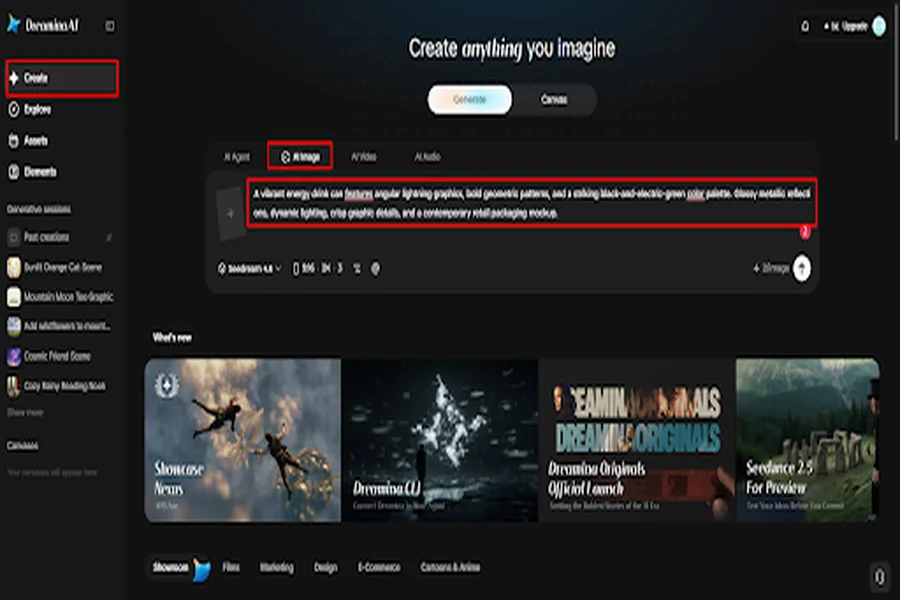
- Next, open the “Create” tab in the left menu and choose the “AI Image” option.
- Next, type a detailed text prompt describing the box, bottle, or pouch that you picture.
- Add details on image elements, theme, and concept, such as materials, colors, and brand labels.
Step 2: Pick a Model, Set Pack Details, and Generate
- Then, choose an image model from the options at the bottom of the dialogue box.
- You can choose Seedream, GPT Image, and Nano Banana models as per your packaging preference.
- Upload a reference image to help Dreamina make your packaging look more precise and natural.
- Next, set a custom aspect ratio and resolution using the “Aspect ratio” and “Resolution” tabs.
- Choose how many packaging variations you want to create using the “Images to generate” tab. Then set the custom dimensions of your packaging mockup using the “Dimensions” tab as needed.
- If you want brand text on the package, use the “Draw text on image” tab.
- Finally, click the “Generate” tab to begin creating your packaging concepts and see the drafts.
Step 3: Polish Your Packaging Mockup and Export
- You will receive the number of packaging drafts you requested within a few short moments. If you dislike the results, click “Edit prompt” or “Regenerate” to refine the packaging results.
- Sharpen your final packaging render for presentations by upscaling it with the “Creative upscale” option.
- Moreover, use “Retouch” to correct, clean up, or enhance details on your selected packaging design.
- Erase anything unwanted from your packaging with “Remove”, or widen it with the “Expand” tab.
- You can continue creating with your generated image by opening the “Generate video” tab to make a video.
- Dreamina gives you complete freedom to edit your packaging concept exactly the way you like.
- Click the “Download” tab at the top right to save the file on your device.
Refine Packaging Mockups Without Rebuilding the Entire Design
Dreamina AI facilitates iterative edits, enhancing packaging aesthetics while maintaining effective design features. Use background colors and lighting for better product visibility. Try out various cap designs, label colors, patterns, effects, and material textures using controlled edits. Minimize distracting props or unwanted objects in the scene. Resize the canvas to add more presentation area, or to make the textures more visible with the available enhancement tools. Vary one major factor, for comparative purposes. If there are inconsistencies in the localized editing, regenerate the image or give a better reference for the next attempt.
Turn Individual Packaging Concepts Into a Cohesive Product Range
A consistent visual identity will make products appear connected throughout a collection. A skin care line may feature a bottle of cleanser, a dropper for serum, a jar of moisturizer, and a tube of sunblock. Carry over common colors, levels of hierarchy, graphic elements, and lighting through individual ideas. Restate key prompt information; rely on pictures to help continuity. Indicate product-specific differences with container shapes, accent colors, and clearly differentiated labels. Dreamina AI can assist in delving into these variations, but it is important to note that there can be inconsistencies among the different images generated. Organize chosen ideas on a presentation board, grouping packaging silhouettes, material choices, and product variations to compare.
Conclusion
Dreamina AI can assist in translating initial packaging concepts into visuals to facilitate creative exploration and discussions. Prompts are detailed, materials are carefully selected, image sizes are appropriate, and refinements are targeted to enhance the value of the images generated. Multiple directions can help to articulate a product’s visual identity prior to physical prototyping. Concept images are not, however, a substitute for verified artwork, production dielines, print proofs, or regulatory checks. Use the generated packaging visuals as a starting point for a design, and create and test the technical files needed for the creation of packaging.